Also, a new versión of MESCC has been released.
They can be downloaded from my website, source code included.
--
SamaruX
(c) Miguel I. Garcia Lopez / FloppySoftware
www.floppysoftware.es
cpm-connections.blogspot.comfloppysoftware@gmail.com
Overview
SamaruX is a Unix-like shell for the CP/M operating system & the Z80 CPU.
It has been developed with MESCC, my Small-C compiler version for CP/M and Z80.
Instead of write separate commands for each task as in real Unix, the shell has some built-in commands.
Of course, it's not at all a new idea (see BusyBox, for example), but I believe this scheme has a lot of advantages in a small environment like CP/M.
For example, we can save some bytes on disk by joining some commands in one file, instead of writing them as separated ones, because we don't have to repeat some shared code in each of them.
Obviously, SamaruX doesn't have all functionalities of Unix, but it has some nice and useful commands, to work in a Unix-like system, under our beloved CP/M operating system.
Some SamaruX functionalities are:
-Redirection of stdin and stdout with > and <.
-Piping with |.
-Environment with variables $TERM, $USER, etc.
-Command line history.
-Profiling for environment customization.
-Command aliasing.
-Batch processing with flow control and arguments passing.
-Complete on-line manual.
-Prompt customization.
-Built-in commands: cp, rm, mv, man, cat, more, grep ...
This document is not an exhaustive reference of SamaruX, but only an overview, in order to show some of its capabilities.
Please, refer to the manual for a complete description.
Execution modes
There are two execution modes:
-CP/M mode: The SamaruX shell will execute only a command and will return to CP/M.
-Interactive mode: The SamaruX shell will read and execute your commands from the keyboard, until you return to CP/M.
CP/M mode example:
A>sx echo Hello world!
Hello world!
A>
Interactive mode example:
A>sx
Samarux v1.00 / 29 Dec 2014 - (c) FloppySoftware, Spain
CP/M version 2.2
28 built-in commands
Hi FloppySoftware welcome to Samarux!
[FloppySoftware at B00:] $ env
TERM = vt52
USER = FloppySoftware
PROMPT = [%u at %w] %$
[FloppySoftware at B00:] $ exit
A>
Profiling
With profiling, you can customize your SamaruX environment.
Its use it's not compulsory, but highly recommended (and useful).
There are two files for profiling::
-profile.sx: For the CP/M mode.
-profcpm.sx: For the interactive mode.
An example of profiling in interactive mode:
# -------------------------- #
# SAMARUX START-UP PROFILE #
# -------------------------- #
env TERM vt52
env USER FloppySoftware
env PROMPT [%u at %w] %$
#
alias h history 0
alias logout exit
#
echo Hi $USER welcome to Samarux!
echo
Piping and redirection
With SamaruX, you can enter useful command lines like:
-cat letter.txt | more
-grep 'Gary Kildall' cpm.txt article.doc news.txt > refs.txt
-ls -l *.h *.c > cfiles.txt
-man cat | more
Command line
You can separate commands in the same line with the semicolon (;):
man cp > cp.txt ; clear ; cat cp.txt | more
You can include environment variables in your command lines:
env NAME Julius ; echo My name is $NAME
An argument can contain spaces if it is surrounded by single quotes ('):
env NAME 'Julius Smith' ; echo My name is $NAME
SamaruX has a command line history facility.
To see the history, just type:
history
And the history command will reply something like:
[FloppySoftware at B00:] $ history
0: cat manual.doc | more
1: ed letter.txt
2: ls *.c
3: man cat
To select a history command entry, just type its number:
history 2
And the shell will present a command line, ready to be edited and / or executed:
[FloppySoftware at B00:] $ ls *.c
Executing CP/M commands
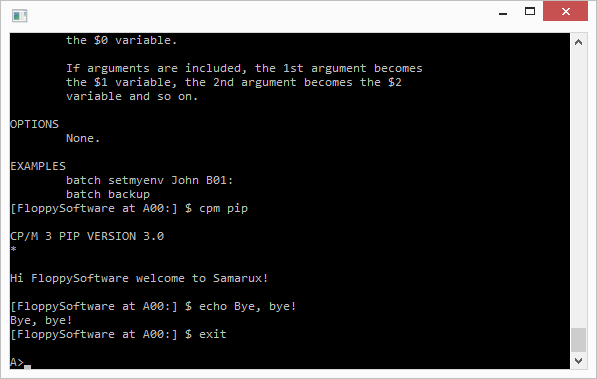
You can execute CP/M commands by using the cpm command:
cpm PIP A:=M:*.COM
You will return to SamaruX, once the CP/M command had finished its work.
Aliases
You can make aliases for your most frequently used commands:
alias dirall ls -f
Then, you can enter the defined alias as a single word:
dirall
Small text editor
SamaruX has the ed command, a very humble text editor, but very useful to create and edit small text files in a fast way.
[FloppySoftware at B00:] $ ed profile.sx
File : profile.sx
Lines: 14/48
ed> print
0: # -------------------------- #
1: # SAMARUX START-UP PROFILE #
2: # -------------------------- #
3: # env HOME A00:
4: env TERM vt52
5: # env TEMP M00:
6: env USER FloppySoftware
7: env PROMPT [%u at %w] %$
8: #
9: alias h history 0
10: alias logout exit
11: #
12: echo Hi $USER welcome to Samarux!
13: echo
ed> edit 8
8: # This is a comment
Help!
SamaruX has a built-in command named man, to offer on-line help about commands an other topics.
The help contents is stored in the man.sx file.
As this file is an ordinary text file with a simple structure, you can even add or modify topics.
To see the available topics, just type:
man | more
To read about a topic in particular, say cat, just type:
man cat | more
In addition to this, SamaruX has a built-in command named builtin, that prints the name of all available built-in commands. Just type:
builtin
Batch processing and flow control
With the batch command, you can process files with commands as if they were typed on the keyboard.
Some other SamaruX commands will help you with flow control in batch processing:
-if
-goto
-read
-exit
An example:
# ----------- #
# TEST SCRIPT #
# ----------- #
#
echo Test Script
echo ===========
# Menu:
echo
echo 1 : Option One
echo 2 : Option Two
echo 0 : Exit
echo
echo -n Your choice:
read OP
echo
if $OP eq 1 goto One
if $OP eq 2 goto Two
if $OP eq 0 goto Exit
echo Bad choice, try again.
goto Menu
# One:
echo Your choice was Option One.
goto Menu
# Two:
echo Your choice was Option Two.
goto Menu
# Exit:
env OP
You can include arguments in batch processing.
If you have a file named write.sx with this contents:
echo $1 $2 $3
And you type:
batch write.sx How are you?
The system will reply with:
How are you?
License
Copyright (c) Miguel I. Garcia Lopez / FloppySoftware, Spain
This program is free software; you can redistribute it and/or modify it under the terms of the GNU General Public License as published by the Free Software Foundation; either version 2, or (at your option) any later version.
This program is distributed in the hope that it will be useful, but WITHOUT ANY WARRANTY; without even the implied warranty of MERCHANTABILITY or FITNESS FOR A PARTICULAR PURPOSE. See the GNU General Public License for more details.
You should have received a copy of the GNU General Public License along with this program; if not, write to the Free Software Foundation, 675 Mass Ave, Cambridge, MA 02139, USA.
--