It's available a new release of MESCC: v1.08 - 04 Sep 2015.
It has only a small change, that will enable (optionally) the support for directory names, under CP/M.
See the library cpm.h for more details.
Showing posts with label MESCC. Show all posts
Showing posts with label MESCC. Show all posts
Friday, September 4, 2015


SamaruX and directory names
SamaruX has now support for directory names.
With the use of the new built-in command diralias, you can reference a directory (a drive and user specification) with a name.
I.E.:
diralias root a0:
diralias temp m0:
diralias mescc a3:
cat mescc:sx.c | more
ls root:*.x
cd root:
It's a good idea to include the diralias commands in you SamaruX profile.
With the use of the new built-in command diralias, you can reference a directory (a drive and user specification) with a name.
I.E.:
diralias root a0:
diralias temp m0:
diralias mescc a3:
cat mescc:sx.c | more
ls root:*.x
cd root:
It's a good idea to include the diralias commands in you SamaruX profile.
Sunday, August 30, 2015
XPCW - graphics for the Amstrad PCW
XPCW is a graphics and keyboard library for the Amstrad PCW, under the CP/M operating system.
It consists of a CP/M Plus RSX file, with some library files (.h) for MESCC, my own version of the Small-C compiler.
The RSX is written in Z80 assembler source code.
It can be accessed by any CP/M program or language, provided it follows its conventions (read the RSX source code for more information).
The XPCW.RSX file, has to be attached to any program that uses this library.
Only one MESCC library is needed (xpcw.h), the other are optional.
The libraries are:
•xpcw.h - Main library.
•xdraw.h - Functions to draw pixels, lines, etc.
•xtext.h - Functions to write text, set the font, change attributes, etc.
•xchrdef.h - Functions to get / set character definitions.
•xbitmap.h - Functions to draw bitmaps.
•xkeyb.h - Functions to access the keyboard.
You can download XPCW in binary and source code form, from my website (includes Squarex, a little game).

It consists of a CP/M Plus RSX file, with some library files (.h) for MESCC, my own version of the Small-C compiler.
The RSX is written in Z80 assembler source code.
It can be accessed by any CP/M program or language, provided it follows its conventions (read the RSX source code for more information).
The XPCW.RSX file, has to be attached to any program that uses this library.
Only one MESCC library is needed (xpcw.h), the other are optional.
The libraries are:
•xpcw.h - Main library.
•xdraw.h - Functions to draw pixels, lines, etc.
•xtext.h - Functions to write text, set the font, change attributes, etc.
•xchrdef.h - Functions to get / set character definitions.
•xbitmap.h - Functions to draw bitmaps.
•xkeyb.h - Functions to access the keyboard.
You can download XPCW in binary and source code form, from my website (includes Squarex, a little game).

SquareX, a game for the Amstrad PCW
SquareX is a game released in September 2015, as a present for the Amstrad PCW, in its 30th anniversary.
Your goal is to complete lines (or rows) of squares, with the pieces that fall from the top of the screen.
The completed lines will disappear.
Do you remember the name of a game that does something similar?
Er... humm... yes, you do, don't you?
This game has been developed with MESCC, my own Small-C compiler version, and the XPCW library for the Amstrad PCW.

Your goal is to complete lines (or rows) of squares, with the pieces that fall from the top of the screen.
The completed lines will disappear.
Do you remember the name of a game that does something similar?
Er... humm... yes, you do, don't you?
This game has been developed with MESCC, my own Small-C compiler version, and the XPCW library for the Amstrad PCW.

SamaruX v2.02 released.
New in v2.02 / 22 Ago 2015:
- Enhanced support of SamaruX external commands.
- New examples of SamaruX external commands: banner, cal, head, whoami, strings.
- Enhanced support of SamaruX external commands.
- New examples of SamaruX external commands: banner, cal, head, whoami, strings.
MESCC v1.07 released.
I have just uploaded to my website MESCC v1.07.
Now, it is supplied with the following libraries:
mescc.h, alloc.h, clock.h, conio.h, cpm.h, ctype.h, fileio.h, fprintf.h, mem.h, printf.h, rand.h, setjmp.h, sprintf.h, string.h, xprintf.h and z80.h.
Now, it is supplied with the following libraries:
mescc.h, alloc.h, clock.h, conio.h, cpm.h, ctype.h, fileio.h, fprintf.h, mem.h, printf.h, rand.h, setjmp.h, sprintf.h, string.h, xprintf.h and z80.h.
Friday, May 8, 2015
te - My small, humble, portable and useful text editor.
+----+
| te +-------------+
+----| Text Editor |
+-------------+
v1.00 / 07 May 2015
(c) 2015 Miguel Garcia / FloppySoftware
www.floppysoftware.es
cpm-connections.blogspot.com
floppysoftware@gmail.com
Introduction
------------
The te text editor is small, humble, and useful.
It's screen oriented, and can be easily adapted to a lot of computers.
Command line
------------
It's simple:
te [filename]
Examples:
te - To start an empty document
te notes.txt - To edit the document 'notes.txt'.
The screen layout
-----------------
On the first screen line, you will see - ie:
te: NOTES.TXT - The file name of the document your are editing.
And something like:
Lin:0015/0042/0512 Col:32/90 Len:36
The numbers following 'Lin' are:
0015 - The line number you are editing right now.
0042 - The current total number of lines.
0512 - The maximum number of lines.
The numbers following 'Col' are:
32 - The column number on which you are.
90 - The number of screen columns.
And, finally, the number following 'Len' is:
36 - The length of the current line.
On the last screen line, you will see program messages.
The options menu
----------------
You can enter to the menu, by pressing the ESCAPE key, as shown
in the messages line:
Press [EXIT] to show the menú.
Note that the name of your ESCAPE key may change, depending of
the program adaptation.
The options are:
New - To start a new document
Open - To open a document
Save - To save the current document
save As - To save the current document under another filename.
Help - To show the help screen.
aBout te - To show some te information.
eXit te - To quit the program.
You can select an option by pressing the character in uppercase.
To leave the menu, you must press ESCAPE.
If you start a new document, the 'Save' option will redirect to you to the 'save As' option.
The help screen will show the keyboard configuration, that depends
of the program adaptation.
File backup
-----------
Each time a file is saved, te does a backup of the previous file
contents if it exists.
It is renamed as 'te.bkp'.
Adaptation
----------
The program adaptation is done by editing a small MESCC source code file.
In this file, you must specify the control characters that your
keyboard send, the help contents, and complete a few C functions to
clear the screen, etc.
As there are some adaptations already done, it's possible that your
machine is already included between them.
If not, don't worry, you can start from a similar adaptation.
See the source code files for more information.
Current adaptations are:
- Amstrad PCW and CP/M Plus (31x90 VT52 like terminal).
- Amstrad CPC and CP/M Plus (24x80 VT52 like terminal).
- Spectrum +3 and CP/M Plus (23x51 VT52 like terminal).
- K. Murakami's CP/M emulator (25x80 VT100/Ansi).
- Takeda Toshiya's CP/M emulator (25x80 VT100/Ansi).
- PC and Windows 32 bit (25x80).
- PC and DOS (25x80).
The port to Windows 32 bit has been succesfully done, by converting the MESCC code to Ansi C and recompiling with the Pelles C compiler, using its 'conio.h' library.
The port to DOS has been succesfully compiled with Turbo C v1.01.
License
-------
This program is freeware, and it's licensed under the GPL license.
See the file 'copying.txt' for more details.
| te +-------------+
+----| Text Editor |
+-------------+
v1.00 / 07 May 2015
(c) 2015 Miguel Garcia / FloppySoftware
www.floppysoftware.es
cpm-connections.blogspot.com
floppysoftware@gmail.com
Introduction
------------
The te text editor is small, humble, and useful.
It's screen oriented, and can be easily adapted to a lot of computers.
Command line
------------
It's simple:
te [filename]
Examples:
te - To start an empty document
te notes.txt - To edit the document 'notes.txt'.
The screen layout
-----------------
On the first screen line, you will see - ie:
te: NOTES.TXT - The file name of the document your are editing.
And something like:
Lin:0015/0042/0512 Col:32/90 Len:36
The numbers following 'Lin' are:
0015 - The line number you are editing right now.
0042 - The current total number of lines.
0512 - The maximum number of lines.
The numbers following 'Col' are:
32 - The column number on which you are.
90 - The number of screen columns.
And, finally, the number following 'Len' is:
36 - The length of the current line.
On the last screen line, you will see program messages.
The options menu
----------------
You can enter to the menu, by pressing the ESCAPE key, as shown
in the messages line:
Press [EXIT] to show the menú.
Note that the name of your ESCAPE key may change, depending of
the program adaptation.
The options are:
New - To start a new document
Open - To open a document
Save - To save the current document
save As - To save the current document under another filename.
Help - To show the help screen.
aBout te - To show some te information.
eXit te - To quit the program.
You can select an option by pressing the character in uppercase.
To leave the menu, you must press ESCAPE.
If you start a new document, the 'Save' option will redirect to you to the 'save As' option.
The help screen will show the keyboard configuration, that depends
of the program adaptation.
File backup
-----------
Each time a file is saved, te does a backup of the previous file
contents if it exists.
It is renamed as 'te.bkp'.
Adaptation
----------
The program adaptation is done by editing a small MESCC source code file.
In this file, you must specify the control characters that your
keyboard send, the help contents, and complete a few C functions to
clear the screen, etc.
As there are some adaptations already done, it's possible that your
machine is already included between them.
If not, don't worry, you can start from a similar adaptation.
See the source code files for more information.
Current adaptations are:
- Amstrad PCW and CP/M Plus (31x90 VT52 like terminal).
- Amstrad CPC and CP/M Plus (24x80 VT52 like terminal).
- Spectrum +3 and CP/M Plus (23x51 VT52 like terminal).
- K. Murakami's CP/M emulator (25x80 VT100/Ansi).
- Takeda Toshiya's CP/M emulator (25x80 VT100/Ansi).
- PC and Windows 32 bit (25x80).
- PC and DOS (25x80).
The port to Windows 32 bit has been succesfully done, by converting the MESCC code to Ansi C and recompiling with the Pelles C compiler, using its 'conio.h' library.
The port to DOS has been succesfully compiled with Turbo C v1.01.
License
-------
This program is freeware, and it's licensed under the GPL license.
See the file 'copying.txt' for more details.
Friday, April 10, 2015
MESCC v1.04 - Mike's Enhanced Small C Compiler - released
MESCC v1.04 has just been released.
It include two new libraries:
- rand.h for pseudo-random number generation.
- clock.h for date and time support under CP/M Plus.
It is licensed under the GPL license.
You can download the source and binary files from my website, as usual:
www.floppysoftware.vacau.com
It include two new libraries:
- rand.h for pseudo-random number generation.
- clock.h for date and time support under CP/M Plus.
It is licensed under the GPL license.
You can download the source and binary files from my website, as usual:
www.floppysoftware.vacau.com
Thursday, March 19, 2015
Robots, a game for CP/M-80 and CP/M-86
ROBOTS
------
A GAME FOR CP/M-80 & CP/M-86.
v1.00 - 19 Mar 2015.
R () : : ()
R O B O T S \ [0_0] /
B x-+-:-+-x
R O B O T S |___|
T / \
S \ /
(c) 2015 Miguel Garcia / FloppySoftware
www.floppysoftware.es
cpm-connections.blogspot.com
floppysoftware@gmail.com
THE GAME
--------
Robots is a turn-based game for CP/M-80 & CP/M-86.
Based on ROBOTS, a BSD game (but no source code was taken from it).
The objetive of the robots is only one: to kill you.
The only thing you can do, is to try to escape from them. But use the teletransportation with care: you have only a few teletransport tickets!
The robots will die if they collide between them or crash against something.
That's your only opportunity to win the robots.
Good luck!
GAME FILES
----------
ROBOTS .COM -- Game for CP/M-80.
ROBOTS .CMD -- Game for CP/M-86.
ROBOTS .C -- Source code for MESCC & DR-C.
ROBOTS .TXT -- This help file.
COPYING .TXT -- GNU General Public License.
DOWNLOAD
--------
You can download ROBOTS in binary and source forms from my website.
TECHNICAL NOTES
---------------
This program was developed using MESCC (Mike's Enhanced Small C Compiler - my own version of Small C) for the CP/M-80 version, and Digital Research C for the CP/M-86 version.
See ROBOTS.C for more details.
COPYRIGHT AND LEGAL NOTES
-------------------------
This program is copyright of FLOPPY SOFTWARE from VALENCIA, SPAIN, and is distributed under the GNU GENERAL PUBLIC LICENSE.
Read the COPYING.TXT text file for more details.

------
A GAME FOR CP/M-80 & CP/M-86.
v1.00 - 19 Mar 2015.
R () : : ()
R O B O T S \ [0_0] /
B x-+-:-+-x
R O B O T S |___|
T / \
S \ /
(c) 2015 Miguel Garcia / FloppySoftware
www.floppysoftware.es
cpm-connections.blogspot.com
floppysoftware@gmail.com
THE GAME
--------
Robots is a turn-based game for CP/M-80 & CP/M-86.
Based on ROBOTS, a BSD game (but no source code was taken from it).
The objetive of the robots is only one: to kill you.
The only thing you can do, is to try to escape from them. But use the teletransportation with care: you have only a few teletransport tickets!
The robots will die if they collide between them or crash against something.
That's your only opportunity to win the robots.
Good luck!
GAME FILES
----------
ROBOTS .COM -- Game for CP/M-80.
ROBOTS .CMD -- Game for CP/M-86.
ROBOTS .C -- Source code for MESCC & DR-C.
ROBOTS .TXT -- This help file.
COPYING .TXT -- GNU General Public License.
DOWNLOAD
--------
You can download ROBOTS in binary and source forms from my website.
TECHNICAL NOTES
---------------
This program was developed using MESCC (Mike's Enhanced Small C Compiler - my own version of Small C) for the CP/M-80 version, and Digital Research C for the CP/M-86 version.
See ROBOTS.C for more details.
COPYRIGHT AND LEGAL NOTES
-------------------------
This program is copyright of FLOPPY SOFTWARE from VALENCIA, SPAIN, and is distributed under the GNU GENERAL PUBLIC LICENSE.
Read the COPYING.TXT text file for more details.
Monday, February 23, 2015
SamaruX v1.00 released
I'm proud to announce the release of SamaruX v1.00, my Unix-like shell project for CP/M.
Also, a new versión of MESCC has been released.
They can be downloaded from my website, source code included.
--
SamaruX
(c) Miguel I. Garcia Lopez / FloppySoftware
www.floppysoftware.es
cpm-connections.blogspot.comfloppysoftware@gmail.com
Overview
SamaruX is a Unix-like shell for the CP/M operating system & the Z80 CPU.
It has been developed with MESCC, my Small-C compiler version for CP/M and Z80.
Instead of write separate commands for each task as in real Unix, the shell has some built-in commands.
Of course, it's not at all a new idea (see BusyBox, for example), but I believe this scheme has a lot of advantages in a small environment like CP/M.
For example, we can save some bytes on disk by joining some commands in one file, instead of writing them as separated ones, because we don't have to repeat some shared code in each of them.
Obviously, SamaruX doesn't have all functionalities of Unix, but it has some nice and useful commands, to work in a Unix-like system, under our beloved CP/M operating system.
Some SamaruX functionalities are:
-Redirection of stdin and stdout with > and <.
-Piping with |.
-Environment with variables $TERM, $USER, etc.
-Command line history.
-Profiling for environment customization.
-Command aliasing.
-Batch processing with flow control and arguments passing.
-Complete on-line manual.
-Prompt customization.
-Built-in commands: cp, rm, mv, man, cat, more, grep ...
This document is not an exhaustive reference of SamaruX, but only an overview, in order to show some of its capabilities.
Please, refer to the manual for a complete description.
Execution modes
There are two execution modes:
-CP/M mode: The SamaruX shell will execute only a command and will return to CP/M.
-Interactive mode: The SamaruX shell will read and execute your commands from the keyboard, until you return to CP/M.
CP/M mode example:
A>sx echo Hello world!
Hello world!
A>
Interactive mode example:
A>sx
Samarux v1.00 / 29 Dec 2014 - (c) FloppySoftware, Spain
CP/M version 2.2
28 built-in commands
Hi FloppySoftware welcome to Samarux!
[FloppySoftware at B00:] $ env
TERM = vt52
USER = FloppySoftware
PROMPT = [%u at %w] %$
[FloppySoftware at B00:] $ exit
A>
Profiling
With profiling, you can customize your SamaruX environment.
Its use it's not compulsory, but highly recommended (and useful).
There are two files for profiling::
-profile.sx: For the CP/M mode.
-profcpm.sx: For the interactive mode.
An example of profiling in interactive mode:
# -------------------------- #
# SAMARUX START-UP PROFILE #
# -------------------------- #
env TERM vt52
env USER FloppySoftware
env PROMPT [%u at %w] %$
#
alias h history 0
alias logout exit
#
echo Hi $USER welcome to Samarux!
echo
Piping and redirection
With SamaruX, you can enter useful command lines like:
-cat letter.txt | more
-grep 'Gary Kildall' cpm.txt article.doc news.txt > refs.txt
-ls -l *.h *.c > cfiles.txt
-man cat | more
Command line
You can separate commands in the same line with the semicolon (;):
man cp > cp.txt ; clear ; cat cp.txt | more
You can include environment variables in your command lines:
env NAME Julius ; echo My name is $NAME
An argument can contain spaces if it is surrounded by single quotes ('):
env NAME 'Julius Smith' ; echo My name is $NAME
SamaruX has a command line history facility.
To see the history, just type:
history
And the history command will reply something like:
[FloppySoftware at B00:] $ history
0: cat manual.doc | more
1: ed letter.txt
2: ls *.c
3: man cat
To select a history command entry, just type its number:
history 2
And the shell will present a command line, ready to be edited and / or executed:
[FloppySoftware at B00:] $ ls *.c
Executing CP/M commands
You can execute CP/M commands by using the cpm command:
cpm PIP A:=M:*.COM
You will return to SamaruX, once the CP/M command had finished its work.
Aliases
You can make aliases for your most frequently used commands:
alias dirall ls -f
Then, you can enter the defined alias as a single word:
dirall
Small text editor
SamaruX has the ed command, a very humble text editor, but very useful to create and edit small text files in a fast way.
[FloppySoftware at B00:] $ ed profile.sx
File : profile.sx
Lines: 14/48
ed> print
0: # -------------------------- #
1: # SAMARUX START-UP PROFILE #
2: # -------------------------- #
3: # env HOME A00:
4: env TERM vt52
5: # env TEMP M00:
6: env USER FloppySoftware
7: env PROMPT [%u at %w] %$
8: #
9: alias h history 0
10: alias logout exit
11: #
12: echo Hi $USER welcome to Samarux!
13: echo
ed> edit 8
8: # This is a comment
Help!
SamaruX has a built-in command named man, to offer on-line help about commands an other topics.
The help contents is stored in the man.sx file.
As this file is an ordinary text file with a simple structure, you can even add or modify topics.
To see the available topics, just type:
man | more
To read about a topic in particular, say cat, just type:
man cat | more
In addition to this, SamaruX has a built-in command named builtin, that prints the name of all available built-in commands. Just type:
builtin
Batch processing and flow control
With the batch command, you can process files with commands as if they were typed on the keyboard.
Some other SamaruX commands will help you with flow control in batch processing:
-if
-goto
-read
-exit
An example:
# ----------- #
# TEST SCRIPT #
# ----------- #
#
echo Test Script
echo ===========
# Menu:
echo
echo 1 : Option One
echo 2 : Option Two
echo 0 : Exit
echo
echo -n Your choice:
read OP
echo
if $OP eq 1 goto One
if $OP eq 2 goto Two
if $OP eq 0 goto Exit
echo Bad choice, try again.
goto Menu
# One:
echo Your choice was Option One.
goto Menu
# Two:
echo Your choice was Option Two.
goto Menu
# Exit:
env OP
You can include arguments in batch processing.
If you have a file named write.sx with this contents:
echo $1 $2 $3
And you type:
batch write.sx How are you?
The system will reply with:
How are you?
License
Copyright (c) Miguel I. Garcia Lopez / FloppySoftware, Spain
This program is free software; you can redistribute it and/or modify it under the terms of the GNU General Public License as published by the Free Software Foundation; either version 2, or (at your option) any later version.
This program is distributed in the hope that it will be useful, but WITHOUT ANY WARRANTY; without even the implied warranty of MERCHANTABILITY or FITNESS FOR A PARTICULAR PURPOSE. See the GNU General Public License for more details.
You should have received a copy of the GNU General Public License along with this program; if not, write to the Free Software Foundation, 675 Mass Ave, Cambridge, MA 02139, USA.
--


Also, a new versión of MESCC has been released.
They can be downloaded from my website, source code included.
--
SamaruX
(c) Miguel I. Garcia Lopez / FloppySoftware
www.floppysoftware.es
cpm-connections.blogspot.comfloppysoftware@gmail.com
Overview
SamaruX is a Unix-like shell for the CP/M operating system & the Z80 CPU.
It has been developed with MESCC, my Small-C compiler version for CP/M and Z80.
Instead of write separate commands for each task as in real Unix, the shell has some built-in commands.
Of course, it's not at all a new idea (see BusyBox, for example), but I believe this scheme has a lot of advantages in a small environment like CP/M.
For example, we can save some bytes on disk by joining some commands in one file, instead of writing them as separated ones, because we don't have to repeat some shared code in each of them.
Obviously, SamaruX doesn't have all functionalities of Unix, but it has some nice and useful commands, to work in a Unix-like system, under our beloved CP/M operating system.
Some SamaruX functionalities are:
-Redirection of stdin and stdout with > and <.
-Piping with |.
-Environment with variables $TERM, $USER, etc.
-Command line history.
-Profiling for environment customization.
-Command aliasing.
-Batch processing with flow control and arguments passing.
-Complete on-line manual.
-Prompt customization.
-Built-in commands: cp, rm, mv, man, cat, more, grep ...
This document is not an exhaustive reference of SamaruX, but only an overview, in order to show some of its capabilities.
Please, refer to the manual for a complete description.
Execution modes
There are two execution modes:
-CP/M mode: The SamaruX shell will execute only a command and will return to CP/M.
-Interactive mode: The SamaruX shell will read and execute your commands from the keyboard, until you return to CP/M.
CP/M mode example:
A>sx echo Hello world!
Hello world!
A>
Interactive mode example:
A>sx
Samarux v1.00 / 29 Dec 2014 - (c) FloppySoftware, Spain
CP/M version 2.2
28 built-in commands
Hi FloppySoftware welcome to Samarux!
[FloppySoftware at B00:] $ env
TERM = vt52
USER = FloppySoftware
PROMPT = [%u at %w] %$
[FloppySoftware at B00:] $ exit
A>
Profiling
With profiling, you can customize your SamaruX environment.
Its use it's not compulsory, but highly recommended (and useful).
There are two files for profiling::
-profile.sx: For the CP/M mode.
-profcpm.sx: For the interactive mode.
An example of profiling in interactive mode:
# -------------------------- #
# SAMARUX START-UP PROFILE #
# -------------------------- #
env TERM vt52
env USER FloppySoftware
env PROMPT [%u at %w] %$
#
alias h history 0
alias logout exit
#
echo Hi $USER welcome to Samarux!
echo
Piping and redirection
With SamaruX, you can enter useful command lines like:
-cat letter.txt | more
-grep 'Gary Kildall' cpm.txt article.doc news.txt > refs.txt
-ls -l *.h *.c > cfiles.txt
-man cat | more
Command line
You can separate commands in the same line with the semicolon (;):
man cp > cp.txt ; clear ; cat cp.txt | more
You can include environment variables in your command lines:
env NAME Julius ; echo My name is $NAME
An argument can contain spaces if it is surrounded by single quotes ('):
env NAME 'Julius Smith' ; echo My name is $NAME
SamaruX has a command line history facility.
To see the history, just type:
history
And the history command will reply something like:
[FloppySoftware at B00:] $ history
0: cat manual.doc | more
1: ed letter.txt
2: ls *.c
3: man cat
To select a history command entry, just type its number:
history 2
And the shell will present a command line, ready to be edited and / or executed:
[FloppySoftware at B00:] $ ls *.c
Executing CP/M commands
You can execute CP/M commands by using the cpm command:
cpm PIP A:=M:*.COM
You will return to SamaruX, once the CP/M command had finished its work.
Aliases
You can make aliases for your most frequently used commands:
alias dirall ls -f
Then, you can enter the defined alias as a single word:
dirall
Small text editor
SamaruX has the ed command, a very humble text editor, but very useful to create and edit small text files in a fast way.
[FloppySoftware at B00:] $ ed profile.sx
File : profile.sx
Lines: 14/48
ed> print
0: # -------------------------- #
1: # SAMARUX START-UP PROFILE #
2: # -------------------------- #
3: # env HOME A00:
4: env TERM vt52
5: # env TEMP M00:
6: env USER FloppySoftware
7: env PROMPT [%u at %w] %$
8: #
9: alias h history 0
10: alias logout exit
11: #
12: echo Hi $USER welcome to Samarux!
13: echo
ed> edit 8
8: # This is a comment
Help!
SamaruX has a built-in command named man, to offer on-line help about commands an other topics.
The help contents is stored in the man.sx file.
As this file is an ordinary text file with a simple structure, you can even add or modify topics.
To see the available topics, just type:
man | more
To read about a topic in particular, say cat, just type:
man cat | more
In addition to this, SamaruX has a built-in command named builtin, that prints the name of all available built-in commands. Just type:
builtin
Batch processing and flow control
With the batch command, you can process files with commands as if they were typed on the keyboard.
Some other SamaruX commands will help you with flow control in batch processing:
-if
-goto
-read
-exit
An example:
# ----------- #
# TEST SCRIPT #
# ----------- #
#
echo Test Script
echo ===========
# Menu:
echo
echo 1 : Option One
echo 2 : Option Two
echo 0 : Exit
echo
echo -n Your choice:
read OP
echo
if $OP eq 1 goto One
if $OP eq 2 goto Two
if $OP eq 0 goto Exit
echo Bad choice, try again.
goto Menu
# One:
echo Your choice was Option One.
goto Menu
# Two:
echo Your choice was Option Two.
goto Menu
# Exit:
env OP
You can include arguments in batch processing.
If you have a file named write.sx with this contents:
echo $1 $2 $3
And you type:
batch write.sx How are you?
The system will reply with:
How are you?
License
Copyright (c) Miguel I. Garcia Lopez / FloppySoftware, Spain
This program is free software; you can redistribute it and/or modify it under the terms of the GNU General Public License as published by the Free Software Foundation; either version 2, or (at your option) any later version.
This program is distributed in the hope that it will be useful, but WITHOUT ANY WARRANTY; without even the implied warranty of MERCHANTABILITY or FITNESS FOR A PARTICULAR PURPOSE. See the GNU General Public License for more details.
You should have received a copy of the GNU General Public License along with this program; if not, write to the Free Software Foundation, 675 Mass Ave, Cambridge, MA 02139, USA.
--
Sunday, January 4, 2015
Samarux, *nix shell for CP/M
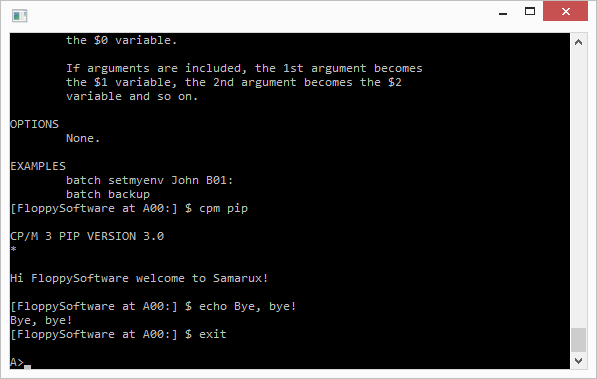
I am working in my old project to build a *nix shell type for CP/M in MESCC.
Over the time, it has gain a lot of functionality and new commands.
It has now pipes, redirection, environment variables and aliases.
It has many built-in commands: cat, more, pwd, ls, rm, mv, echo, batch, man, etc. and it's able to execute CP/M programas too (well, by using the $$$.SUB trick).
It can execute a profile file to set-up the environment and aliases.
It can execute Samarux built-in commands directly from the CP/M CCP command line.
Samarux, (this is its name), can run on any computer running any CP/M version on a Z80 cpu.
My intention is to release the Samarux under the GLP license.
When?
Well, very soon, I hope.


Over the time, it has gain a lot of functionality and new commands.
It has now pipes, redirection, environment variables and aliases.
It has many built-in commands: cat, more, pwd, ls, rm, mv, echo, batch, man, etc. and it's able to execute CP/M programas too (well, by using the $$$.SUB trick).
It can execute a profile file to set-up the environment and aliases.
It can execute Samarux built-in commands directly from the CP/M CCP command line.
Samarux, (this is its name), can run on any computer running any CP/M version on a Z80 cpu.
My intention is to release the Samarux under the GLP license.
When?
Well, very soon, I hope.
Saturday, August 30, 2014
WTD / What To Do v1.0 - Released
WTD / What To Do v1.0, released under the GPL license, source code included.
WTD is a "to do list" manager for the CP/M operating system and the Z80 cpu.
It has been written in MESCC, and follows the format and rules of Gina Trapani and his todo.txt system.
You can download from my website.


By the way, it has been ported from MESCC to Pelles C for Windows in a hurry (more information on this soon).
WTD is a "to do list" manager for the CP/M operating system and the Z80 cpu.
It has been written in MESCC, and follows the format and rules of Gina Trapani and his todo.txt system.
You can download from my website.
By the way, it has been ported from MESCC to Pelles C for Windows in a hurry (more information on this soon).
Wednesday, August 6, 2014
UMMO - New game for the Amstrad PCW
I have developed a new game for the Amstrad PCW.


Its name is UMMO, and is a classical "kill the invaders" game, with some asteroids too.
It has been developed with MESCC, my own version of the Small C compiler, some libraries from SAMARUC, my GUI for the Amstrad PCW, and a game engine called TWO (The World Of) inspired in Greenfoot.
It runs from CP/M.
You can download from my website http://www.floppysoftware.es.


Sunday, July 20, 2014
Find that Mine! for CP/M & Z80
I have developed a version of my game Find that mine! for CP/M.
It is derived from the source code of the Amstrad PCW and my GUI Samaruc, and it should run on any Z80 computer running any version of CP/M.
It has been write with MESCC, my own version of Small C Compiler, and it has been released under the GNU General Public License, source code included.
And... yes, it's another clon of MineSweeper!
You can download from my website: www.floppysoftware.es

It is derived from the source code of the Amstrad PCW and my GUI Samaruc, and it should run on any Z80 computer running any version of CP/M.
It has been write with MESCC, my own version of Small C Compiler, and it has been released under the GNU General Public License, source code included.
And... yes, it's another clon of MineSweeper!
You can download from my website: www.floppysoftware.es

Sunday, August 4, 2013
DeskJoy, a simple desktop utility to run programs for the Amstrad PCW
It is available in my website another program developed with Samaruc and MESCC: DeskJoy, a desktop utility with the ability of run programs on the Amstrad PCW, with icons, windows, menus, buttons, etc.


It can run CP/M programs and it has some internal utilities too (Character map, Screen Saver, Samaruc Control Panel).
It can create new links, modify them, erase them, move them, etc.
You can set some properties for each link: title, command line, icon, screen, enable the cursor, set pause after run the program, etc., to help to configure the environment for the program.
If you want, You can edit the command line before running the program, or do a pause when the program has ended.
Some example links and the newer versions of The Same Game and Find that mine! are included in the disk.


It can run CP/M programs and it has some internal utilities too (Character map, Screen Saver, Samaruc Control Panel).
It can create new links, modify them, erase them, move them, etc.
You can set some properties for each link: title, command line, icon, screen, enable the cursor, set pause after run the program, etc., to help to configure the environment for the program.
If you want, You can edit the command line before running the program, or do a pause when the program has ended.
Some example links and the newer versions of The Same Game and Find that mine! are included in the disk.
Monday, July 29, 2013
Samaruc, a GUI for the Amstrad PCW
I'm working again with Samaruc, a GUI for the Amstrad PCW, with windows, buttons, checkboxes, mouse control, etc.
Samaruc was born as a spin off of Quijote, my HTML reader for the Amstrad PCW.
Quijote was developed in 2004, using MESCC (my version of Small C by Ron Cain), and Z80ASMUK, a public domain assembler from UK, and it has a GUI that was the root for Samaruc.

You can download for free Quijote, MESCC, Z80ASMUK, The Same Game and Find that mine! from my website: http://www.floppysoftware.es/.
Now, I am working with a new version of Samaruc, another game (Roswell), and with a program launcher / desktop called DeskJoy.
You can see some videos on Youtube:
http://www.youtube.com/watch?v=QpJYksyWhVc
http://www.youtube.com/watch?v=S4rSuONWCt4
http://www.youtube.com/watch?v=QrbRp3QioWk
http://www.youtube.com/watch?v=tI7NvlgYa_Y
http://www.youtube.com/watch?v=YIUGX059W3Y
http://www.youtube.com/watch?v=4oBjgIKY9vY
http://www.youtube.com/watch?v=tvd5zrcQzvw
Samaruc was born as a spin off of Quijote, my HTML reader for the Amstrad PCW.
Quijote was developed in 2004, using MESCC (my version of Small C by Ron Cain), and Z80ASMUK, a public domain assembler from UK, and it has a GUI that was the root for Samaruc.
First version of Samaruc was developed in 2012, and included into my games The Same Game and Find that mine!.

You can download for free Quijote, MESCC, Z80ASMUK, The Same Game and Find that mine! from my website: http://www.floppysoftware.es/.
Now, I am working with a new version of Samaruc, another game (Roswell), and with a program launcher / desktop called DeskJoy.
You can see some videos on Youtube:
http://www.youtube.com/watch?v=QpJYksyWhVc
http://www.youtube.com/watch?v=S4rSuONWCt4
http://www.youtube.com/watch?v=QrbRp3QioWk
http://www.youtube.com/watch?v=tI7NvlgYa_Y
http://www.youtube.com/watch?v=YIUGX059W3Y
http://www.youtube.com/watch?v=4oBjgIKY9vY
http://www.youtube.com/watch?v=tvd5zrcQzvw
Tuesday, November 16, 2010
MESCC - Mike's Enhanced Small C Compiler
MESCC is my project of a C compiler for the CP/M operating system and the Z80 cpu.
It is derived from Small C, and it is written in MESCC, and can compile itself.
MESCC generate Z80 assembler code that can be assembled in ZSM/Z80ASMUK, that it is also included, to generate the executable COM file.
Also, an optimizer is included.
It is released under the GNU General Public License, and source code for the compiler, the libraries, the optimizer and the other utilities is included.
My HTML browser for the Amstrad PCW and many other projects are written in MESCC.
If you want to receive a copy of the v1.01 release, please, email me.
Comments, bug reports, etc. are always wellcome.
It is derived from Small C, and it is written in MESCC, and can compile itself.
MESCC generate Z80 assembler code that can be assembled in ZSM/Z80ASMUK, that it is also included, to generate the executable COM file.
Also, an optimizer is included.
It is released under the GNU General Public License, and source code for the compiler, the libraries, the optimizer and the other utilities is included.
My HTML browser for the Amstrad PCW and many other projects are written in MESCC.
If you want to receive a copy of the v1.01 release, please, email me.
Comments, bug reports, etc. are always wellcome.
Subscribe to:
Posts (Atom)